Selasa, 30 Agustus 2011

Hack Using Phoenix

0 komentar
DO IT WITH UR OWN RISK



  • 1. Download Phoenix2011 *Pass = guarforum


  • 2. Kemudian Install


  • 3. Download Firmware


  • 4. Copas Firmware yang sudah di donlot ke C:\Program Files\Nokia\Phoenix\Products\RM-(***) *Jenis RM Hp Anda, tanpa tanda kurung


  • 5. Matikan Hp,Lepas batere (usahakan batere full sebelum proses flashing)


  • 6. Sambungkan HP dengan PC menggunakan USB kabel


  • 7. Buka Phoenix *Win 7 di run as administrator


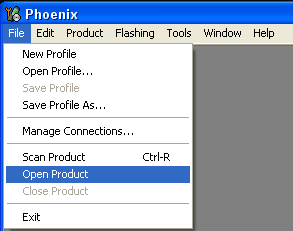
  • 8. Click di File , Open Product


  • 9. Phoenix FW list akan muncul, klik di type filter , dan tulis RM- type hp anda , kemudian klik ok


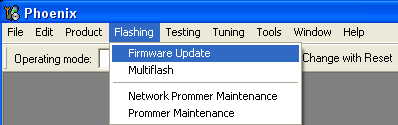
  • 10. Click on Tab Flashing , select Firmware Update


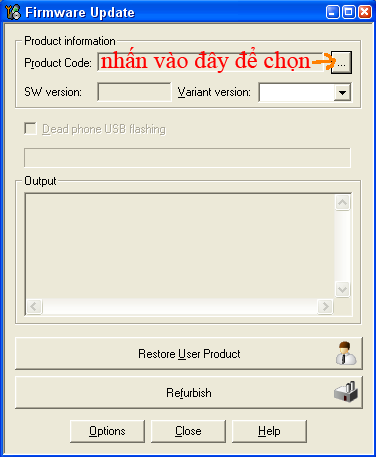
  • 11. Click the box as shown below to select FW


  • 12. Select as shown below, Then Click OK


  • 13. At Firmware Update dialog box, choose Phoenix refurbish a dialog box will appear
    At this time you click OK in the dialog box, insert the battery and hit "switch on button" for second, as shown below


    Leave a Reply

    Labels